
Direct answer
What you need to know
Your Bose SoundTouch speaker has not automatically become unusable. Bose ended its SoundTouch cloud service on 6 May 2026, but its updated app retains local setup, basic controls and speaker grouping. What disappeared includes music-service browsing inside the Bose app and the original cloud-dependent preset experience. That leaves a more useful question than “Is SoundTouch dead?”: How do you want to listen now?
Your Bose SoundTouch speaker has not automatically become unusable. Bose ended its SoundTouch cloud service on 6 May 2026, but its updated app retains local setup, basic controls and speaker grouping. What disappeared includes music-service browsing inside the Bose app and the original cloud-dependent preset experience.
That leaves a more useful question than “Is SoundTouch dead?”: How do you want to listen now?
For some households, an existing connection is enough. Others want radio search and speaker control together on their phone. Start with the listening habit you want to recover, rather than assuming you need new hardware.
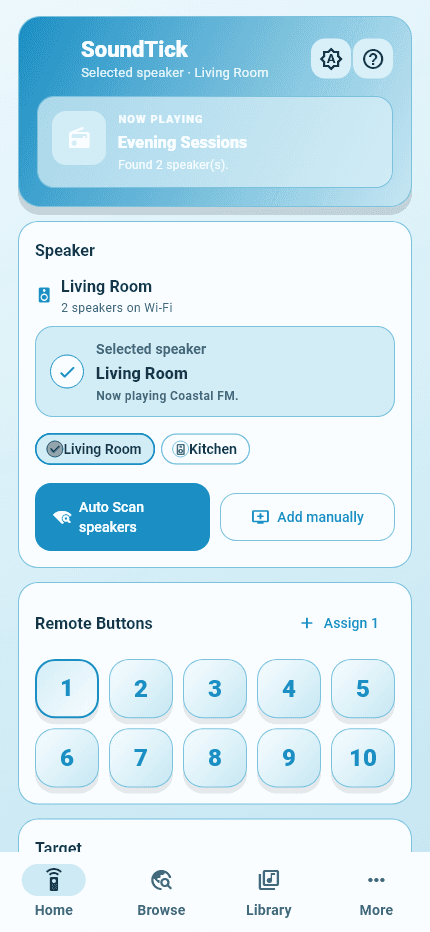
Real SoundTick screens
See the relevant controls in the current app.
Separate the speaker from the service
A wireless speaker combines several things: audio hardware, network connectivity, software controls and access to content. A failure in one part does not prove that every other part has failed.
For example, a station that will not start from an old shortcut is a different problem from a speaker that does not power on. Likewise, a speaker missing from an app may need a network check rather than replacement.
Before buying anything, write down the symptom: “No speaker found,” “One station fails,” or “The numbered button does nothing.” Those descriptions lead to much better troubleshooting than “It no longer works.”
Choose the listening route that suits you
Bose’s current listening guide describes using music-service apps with Bluetooth or supported AirPlay connections, and Spotify through Spotify Connect. Available connections differ by SoundTouch model.
Start by testing a connection your particular speaker already supports. Play something familiar at a modest volume. This helps separate an audio problem from a problem with the old app workflow.
You do not need to use the same method for everything. Keep a connection that works for your playlists and choose a different approach for everyday radio.
Use SoundTick for radio discovery and local control
SoundTick is an independent app for finding internet radio and playing compatible stations on supported SoundTouch speakers. Its App Store listing includes speaker discovery, favourites, playback and volume controls, and compatible speaker grouping.
A practical first session is simple: connect the phone and speaker to your home network, open SoundTick, find the speaker and try one station. Confirm playback and volume control before adding more rooms.
Build the setup gradually. Once one speaker works, save a few stations you genuinely listen to. Then test the next speaker. This is easier to diagnose than changing the network, adding every room and creating groups at the same time.
Check your actual model, not just the product name
SoundTouch model, firmware, network settings and phone permissions can affect available controls. SoundTick does not promise every feature on every SoundTouch product.
When checking an older system, note the full model and series. “SoundTouch 20” is useful, but the series and installed firmware make a support report more precise. A soundbar, standalone speaker and wireless adapter should not automatically be treated as interchangeable.
Keep virtual presets and physical buttons separate
SoundTick’s virtual presets are shortcuts inside the app. They do not rewrite the physical preset buttons on the speaker. Restoring those buttons is a separate technical task.
That distinction matters when choosing software. A favourite you tap on your phone can be convenient without reproducing the original walk-up-and-press-a-button experience.
For the differences, read our explanation of SoundTouch preset buttons and replacement services.
Do you need to replace your SoundTouch system?
Not simply because a familiar workflow changed. First test whether the functions you still need are available through an existing connection or a compatible app.
Replacement becomes a more reasonable choice when the hardware is failing, a must-have service cannot be used satisfactorily, or you value a different system’s supported features more than keeping the current one.
For a comparison of those choices, see Bose SoundTouch alternatives.
Frequently asked questions
Does SoundTick restore every old Bose feature?
No. Treat it as a radio and local-control option, not a promise to recreate the entire former Bose ecosystem. Check its compatibility information against the functions you need.
Can I check compatibility before subscribing?
SoundTick offers 60 days of complimentary access without payment details or an automatic subscription. After that period, a monthly or yearly subscription is required to continue; the app shows the current local price.
Keep the speakers you enjoy using. Start with one room, one station and a listening setup that works for you.
Get SoundTick for iPhone or Android
SoundTick is an independent application and is not affiliated with or endorsed by Bose Corporation. Bose and SoundTouch are trademarks of Bose Corporation, used here to describe compatibility.
Sources and boundaries
Evidence used for this guidance.
Product instructions describe SoundTick's intended behavior. External claims are linked to their primary source. Actual compatibility still depends on the speaker, firmware, phone permissions and network being tested.
- Bose: SoundTouch end-of-service update Reviewed5 September 2026
- Bose: SoundTouch end-of-service listening guide Reviewed5 September 2026
- SoundTick: current App Store listing Reviewed5 September 2026
- SoundTick: speaker compatibility Reviewed5 September 2026
- SoundTick: features and listening workflow Reviewed5 September 2026
- SoundTick testing methodology
- Current known limitations
Related guidance