
Direct answer
What you need to know
To listen to internet radio on a compatible Bose SoundTouch speaker, you need a working station stream and a supported way to start it. SoundTick brings station search and local speaker control together, so you can choose what to hear and where to play it. Start with one speaker and one station. Once that works, add favourites and other rooms.
To listen to internet radio on a compatible Bose SoundTouch speaker, you need a working station stream and a supported way to start it. SoundTick brings station search and local speaker control together, so you can choose what to hear and where to play it.
Start with one speaker and one station. Once that works, add favourites and other rooms.
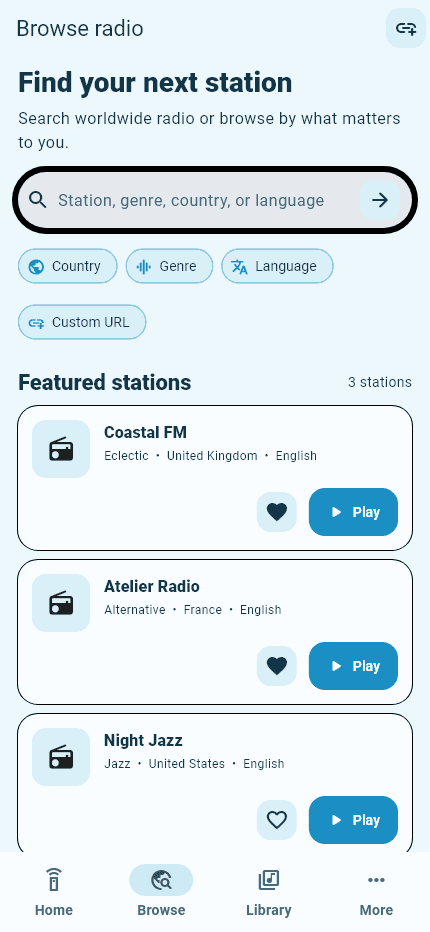
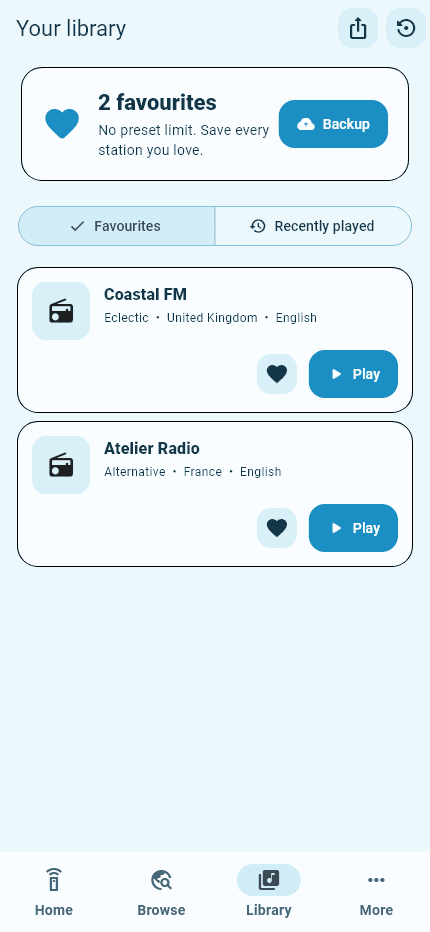
Real SoundTick screens
See the relevant controls in the current app.
Connect the phone and speaker first
Use your secure home network, rather than a guest connection that separates devices. SoundTick needs to reach the speaker locally. If automatic discovery fails, its manual-address option can help when the speaker is reachable but discovery is restricted.
On iPhone, check Settings → Privacy & Security → Local Network and allow SoundTick access. Apple requires apps to request permission before interacting with devices on the local network.
A useful checkpoint is whether the app can identify and control the intended speaker. Resolve discovery before experimenting with multiple radio stations.
Search for a station you already know
Start with the station’s name. If several results look similar, check the location or description rather than assuming the first result is correct. SoundTick also provides country, genre and language filters for discovery.
Try a station you recognise before exploring unfamiliar ones. Hearing the expected programme confirms more than simply seeing a loading indicator: it tells you that you selected the right station and that the playback route works.
Choose the speaker and begin playback
Select your intended SoundTouch speaker, choose the station and start playback. Keep the initial volume low, especially when testing a room you are not standing in.
SoundTick is designed to send compatible radio to the speaker, rather than use Bluetooth to transmit all phone audio. That does not make every stream compatible or eliminate every possible dependency.
When testing whether listening continues independently, start the station and lock the phone. Check what happens on your actual model, app version and stream. Successful playback in the foreground is not, by itself, proof of every background-use scenario.
Save a small, useful radio library
Save stations you will return to, rather than collecting hundreds immediately. A practical starting set might be one news station, one music station and something for quieter listening.
SoundTick offers favourites, listening history and virtual presets. These are app-library features; they are not a claim that the speaker’s physical numbered buttons have been restored.
Give yourself a few days to notice what you actually play. A short list of reliable stations is often more useful than a long list of untested bookmarks.
Add a custom station carefully
SoundTick supports custom stream URLs, but a station’s homepage is not necessarily its audio stream. A browser player may require scripts, authentication or a format the speaker cannot use.
Use a legitimate stream address supplied by the broadcaster where available. Do not assume that a URL copied from the browser’s address bar is suitable, and do not expect a custom URL to bypass a subscription or geographic restriction.
What to do when a station will not play
When only one station fails, try a second station before changing your network. The first stream may have moved, become unavailable or stopped supporting the playback route.
When every station fails, recheck the selected speaker, its connection and the app’s access to it. A working search screen does not prove that the phone can communicate with the speaker.
For a fuller diagnostic sequence, use SoundTouch radio not playing: troubleshooting. If the device itself is missing, start with speaker discovery troubleshooting.
Frequently asked questions
Can I listen to a station outside my country?
Sometimes. Availability depends on the broadcaster, directory and stream. An international listing is not a guarantee of access from every location.
Does an app subscription guarantee every station will work?
No. Station availability and stream formats remain outside SoundTick’s control. Test your regular stations and speakers before choosing a subscription.
Find your station, choose your room and make radio part of your day again.
Explore SoundTick or read how to reconnect SoundTouch to Wi-Fi.
SoundTick is an independent application and is not affiliated with or endorsed by Bose Corporation. Bose and SoundTouch are trademarks of Bose Corporation, used here to describe compatibility.
Sources and boundaries
Evidence used for this guidance.
Product instructions describe SoundTick's intended behavior. External claims are linked to their primary source. Actual compatibility still depends on the speaker, firmware, phone permissions and network being tested.
- SoundTick: features and listening workflow Reviewed5 September 2026
- SoundTick: speaker discovery troubleshooting Reviewed5 September 2026
- Apple: local-network access on iPhone and iPad Reviewed5 September 2026
- SoundTick: current App Store listing Reviewed5 September 2026
- SoundTick: known limitations Reviewed5 September 2026
- SoundTick: radio playback troubleshooting Reviewed5 September 2026
- SoundTick testing methodology
- Current known limitations
Related guidance