
Direct answer
What you need to know
The right Bose SoundTouch alternative depends on what you are trying to replace: a listening app, radio access, physical presets or the entire speaker system. Those are different purchases and different technical problems. Before choosing, finish this sentence: “I want to be able to…”
The right Bose SoundTouch alternative depends on what you are trying to replace: a listening app, radio access, physical presets or the entire speaker system.
Those are different purchases and different technical problems. Before choosing, finish this sentence: “I want to be able to…”
Perhaps the answer is “listen to the news in the kitchen.” It might be “press a numbered button without using my phone.” An option that solves one beautifully may not solve the other at all.
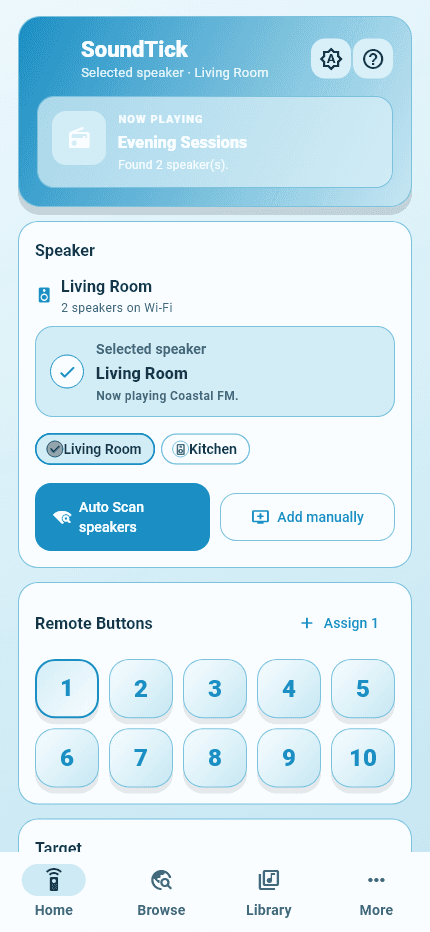
Real SoundTick screens
See the relevant controls in the current app.
Option 1: Keep using connections you already have
Test the listening methods your current hardware supports. Bose describes continued use through compatible Bluetooth, AirPlay, Spotify Connect and wired connections.
This is the sensible starting point when your main goal is to hear content from an app you already use. It may involve less change than adopting a new controller.
The compromise is the workflow: you may start content in the music-service app and use another interface for room control. Try a normal listening session before deciding that this is too inconvenient.
Also check grouping carefully. Bose distinguishes native SoundTouch grouping from grouping through AirPlay 2; they are not interchangeable routes for every source.
Option 2: Use SoundTick for radio and everyday control
SoundTick suits an owner looking for radio search, favourites and local speaker control in a mobile app. It complements the remaining Bose functions rather than claiming to reproduce every retired service.
Consider this route when radio is central to your day and you prefer choosing stations on your phone. Test the stations, speakers and grouping behaviour that matter to your household.
Do not choose it on the assumption that virtual presets automatically repair the speaker’s physical buttons. The SoundTick-versus-Bose comparison explains the scope of the two apps.
Option 3: Explore a community restoration project
Community software is worth investigating when your priority is a deeper restoration of the old experience or integration with an existing home system.
Different projects make different architectural choices. SoundCork documents a replacement service intended for use inside a private home network. AfterTouch also documents a local replacement service. SoundTouch Reborn describes installing an additional agent on the speaker itself.
These are developer descriptions, not an independent compatibility test of every project. Check the current documentation, supported models, installation changes, rollback process and maintenance requirements before proceeding.
An owner who already maintains a home server may find a self-hosted option convenient. Someone who does not want another system to manage may prefer a simpler listening route. Neither preference is wrong.
Option 4: Add a streaming receiver to a suitable input
Where the SoundTouch system has a suitable input, an external receiver may offer another route. Bose’s own guidance describes connecting a wireless audio receiver to AUX on applicable systems.
Before buying, check the output on the receiver against the input on your speaker. Also decide how you will select the source and adjust volume in daily use.
An adapter does not automatically restore native presets or every original control. Think through the whole listening routine, including the extra power supply and cable, rather than comparing only the adapter’s headline feature.
Option 5: Replace the system when the new features justify it
New hardware may be the right choice when your current equipment is unreliable, unsuitable for the room, or missing a function you consider essential.
Make a short requirements list before looking at brands: supported music services, room grouping, physical controls, phone compatibility and the expected support arrangements. Ask what remains usable if an account or cloud service becomes unavailable.
There is no need to replace every room at once. You might keep a working SoundTouch system for radio while changing the room with more demanding requirements.
Compare the complete ownership experience
For each option, ask: What must stay powered on? Who maintains the software? What costs recur? What happens when the phone leaves home? Can the configuration be backed up or undone?
Price is only one part of the answer. Your time, tolerance for troubleshooting and preferred controls also matter.
Frequently asked questions
Is SoundTick an official Bose replacement?
No. SoundTick is independent and is not affiliated with or endorsed by Bose.
Which option is best for restoring physical preset buttons?
Investigate a solution that explicitly documents hardware-button operation, not just favourites in an app. Read our neutral guide to preset restoration and running costs before choosing.
Choose the smallest change that solves your actual listening problem.
For a phone-based radio workflow, explore SoundTick and check it against your own speakers before subscribing.
SoundTick is an independent application and is not affiliated with or endorsed by Bose Corporation. Bose and SoundTouch are trademarks of Bose Corporation, used here to describe compatibility.
Sources and boundaries
Evidence used for this guidance.
Product instructions describe SoundTick's intended behavior. External claims are linked to their primary source. Actual compatibility still depends on the speaker, firmware, phone permissions and network being tested.
- Bose: SoundTouch end-of-service update Reviewed5 September 2026
- Bose: SoundTouch end-of-service listening guide Reviewed5 September 2026
- SoundTick: comparison with the updated Bose app Reviewed5 September 2026
- SoundTick: features and listening workflow Reviewed5 September 2026
- SoundCork: project documentation and security boundary Reviewed5 September 2026
- AfterTouch: current project documentation Reviewed5 September 2026
- SoundTouch Reborn: on-speaker software and installation requirements Reviewed5 September 2026
- SoundTick: current Google Play listing Reviewed5 September 2026
- SoundTick testing methodology
- Current known limitations
Related guidance