
Direct answer
What you need to know
A physical button feels as though it should work locally: press a number and hear your station. That expectation makes the loss of SoundTouch presets particularly frustrating. Bose lists presets among the functions affected by its cloud shutdown, while acknowledging that some existing presets may continue working. A non-working preset does not necessarily mean the button itself is damaged.
A physical button feels as though it should work locally: press a number and hear your station. That expectation makes the loss of SoundTouch presets particularly frustrating.
Bose lists presets among the functions affected by its cloud shutdown, while acknowledging that some existing presets may continue working. A non-working preset does not necessarily mean the button itself is damaged.
The important distinction is this: restoring reliable physical presets needs a working playback mechanism, but it does not always require a paid cloud server.
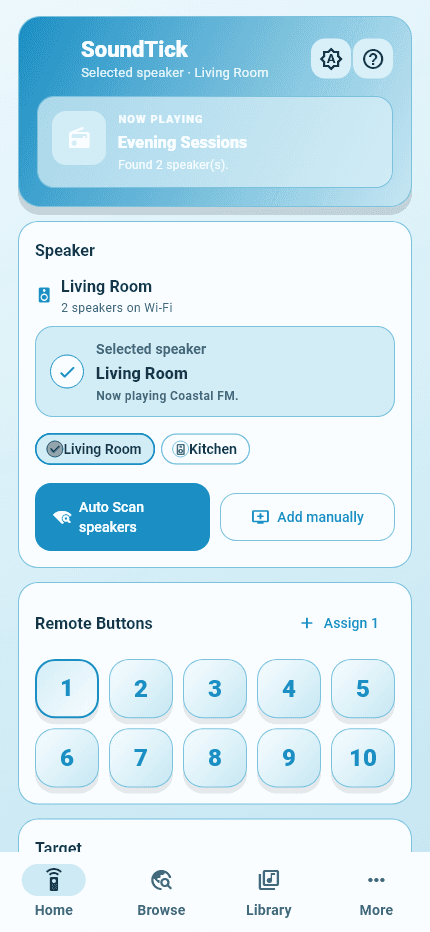
Real SoundTick screens
See the relevant controls in the current app.
Why a physical button can depend on software elsewhere
A preset is an instruction, not a recording of the station. The system must connect the button to content the speaker can actually play.
In a cloud-dependent workflow, storing a preset is only part of the process. Starting it may involve services that identify the source, resolve content or supply information needed for playback. A saved name alone cannot replace those services.
The developer of SoundTouch Bridge describes this distinction directly: preset information can still exist on a speaker while the former route to playing the stream no longer works.
That explains why “the preset is still visible” and “the preset still plays reliably” are different claims.
Why an app shortcut is not the same as a repaired button
When you tap a station inside an app, the app is already running and can issue a playback command. A physical-button press must also work when that app is closed, the phone is asleep or the phone has left home.
A restoration design therefore needs a dependable place to perform whatever work the speaker cannot complete by itself. That might be a local hub, a replacement service, or additional software running on the speaker.
SoundTick’s current virtual presets are shortcuts used inside the app, not a physical-button restoration service. They do not rewrite the speaker’s physical presets.
Three restoration approaches to understand
A local bridge that listens for button presses
A bridge can stay connected to the speaker, detect a preset event and issue a supported playback command. SoundTouch Bridge’s developer describes doing this through a local Homey system using speaker events and a local playback interface.
The important dependency is the local hub. When evaluating this approach, ask whether that hub must remain online and how the system recovers after a restart.
A hub you already own may make this attractive. Buying and maintaining one solely for presets is a different decision.
A local service that replaces missing cloud responses
Projects such as SoundCork and AfterTouch document replacement services that speakers can communicate with instead of the former Bose infrastructure. In this arrangement, “server” can mean software running on equipment in your home; it does not automatically mean renting a cloud machine.
Check the actual installation requirements. A replacement may involve changing speaker configuration, redirecting requests or arranging persistent network addresses. Those details matter more than a general claim that an app “brings everything back.”
SoundCork explicitly says its service belongs inside a private home network, behind a firewall—not on an open network. Do not assume a self-hosted project is suitable for public hosting.
Additional software installed on the speaker
An external machine is not unavoidable. SoundTouch Reborn describes an additional agent installed on the speaker itself, allowing physical presets to operate without leaving the setup computer running.
That shifts the trade-off. Instead of maintaining a separate server, you are installing and maintaining software on the device. Review supported firmware, installation access, update procedures and removal instructions. Treat the project’s claims as documentation to verify on your own hardware, not a guarantee for every system.
Can a phone simply act as the always-on server?
A phone may handle a command while the app is active, but continuous unattended operation is a different requirement. Apple documents background suspension and limited execution modes; Android also restricts background work.
The practical implication is that a working foreground demonstration is not enough. Test with the app closed, the phone locked for an extended period and the phone disconnected from home Wi-Fi. Ask which component is responsible for handling the next button press in each case.
These tests do not make a phone-based design inherently bad. They establish what it can reliably promise.
What costs exist when someone runs a replacement server?
For a hosted service, costs can include compute, storage, backups and data transfer. Public cloud pricing separates these resources, so a small server’s headline monthly price is not necessarily the entire operating cost.
There is also work to account for: security updates, monitoring, troubleshooting, compatibility testing and user support. These are sensible items in a service budget even when the infrastructure bill is modest.
A self-hosted installation has a different budget. Consider any additional hardware, electricity, backups and the owner’s maintenance time. Existing equipment may keep the extra cash cost low; it does not remove the need for someone to look after the system.
On-speaker software can avoid a separate hosting bill, but development and testing still require effort. “No cloud subscription” and “no maintenance required” are not equivalent promises.
Why relaying audio changes the calculation
A service that only exchanges preset settings or short commands has a different workload from one that continuously carries the audio stream.
If the speaker retrieves audio directly from a broadcaster, the replacement service may not carry that audio. If the design proxies the stream, the service handles ongoing traffic for each listener. Outbound data transfer can be a billable resource, although providers may include allowances.
Ask a provider whether its service controls playback or also relays audio. Without that information, it is difficult to judge a claim about bandwidth costs.
Does a recurring cost justify any subscription price?
No. Running costs can explain why a provider charges, but they do not establish whether a particular price is good value.
A paid service should make its scope, dependencies, support and cancellation terms clear. A community project may choose donations or volunteer maintenance. Both can be reasonable models; neither guarantees indefinite availability.
The fair comparison includes what the customer receives and what happens if the service stops. Can presets be exported? Is self-hosting possible? Can the speaker be returned to its previous configuration? What still works without a subscription?
The question to ask before choosing
Ask: “What must remain running for this physical button to work tomorrow?”
Then ask who maintains that component and what it costs. Test a speaker restart, a router restart and an unavailable phone. Separately, remember that an internet radio station still needs a reachable broadcaster stream; local control does not make internet content offline.
A local bridge, replacement server, on-speaker agent and mobile controller solve different problems. The best choice is the one whose behaviour and responsibilities match what you actually need.
For app-based radio and local control, explore SoundTick. For physical-button restoration, compare the specific projects and requirements above rather than treating virtual presets as the same feature.
SoundTick is an independent application and is not affiliated with or endorsed by Bose Corporation. Bose and SoundTouch are trademarks of Bose Corporation, used here to describe compatibility.
Sources and boundaries
Evidence used for this guidance.
Product instructions describe SoundTick's intended behavior. External claims are linked to their primary source. Actual compatibility still depends on the speaker, firmware, phone permissions and network being tested.
- Bose: SoundTouch end-of-service update Reviewed5 September 2026
- SoundTouch Bridge developer: local preset-button handling Reviewed5 September 2026
- SoundTick: features and listening workflow Reviewed5 September 2026
- SoundCork: project documentation and security boundary Reviewed5 September 2026
- AfterTouch: current project documentation Reviewed5 September 2026
- SoundTouch Reborn: on-speaker software and installation requirements Reviewed5 September 2026
- Apple: configuring background execution modes Reviewed5 September 2026
- Android: background tasks overview Reviewed5 September 2026
- Amazon Lightsail: infrastructure pricing categories Reviewed5 September 2026
- Amazon Lightsail: data-transfer allowances Reviewed5 September 2026
- SoundTick testing methodology
- Current known limitations
Related guidance