
Direct answer
What you need to know
After the cloud shutdown, the SoundTouch app can still support local setup, controls and speaker grouping on the same Wi-Fi network, but browsing and starting music from inside the app no longer works. If the app seems not to work, first identify whether the issue is app-based music browsing, speaker discovery, local controls or radio playback.
After the cloud shutdown, the SoundTouch app can still support local setup, controls and speaker grouping on the same Wi-Fi network, but browsing and starting music from inside the app no longer works.
A message that the app is not working can describe several different problems. Identify the failed action before resetting equipment or changing your network.
Real SoundTick screens
See the relevant controls in the current app.
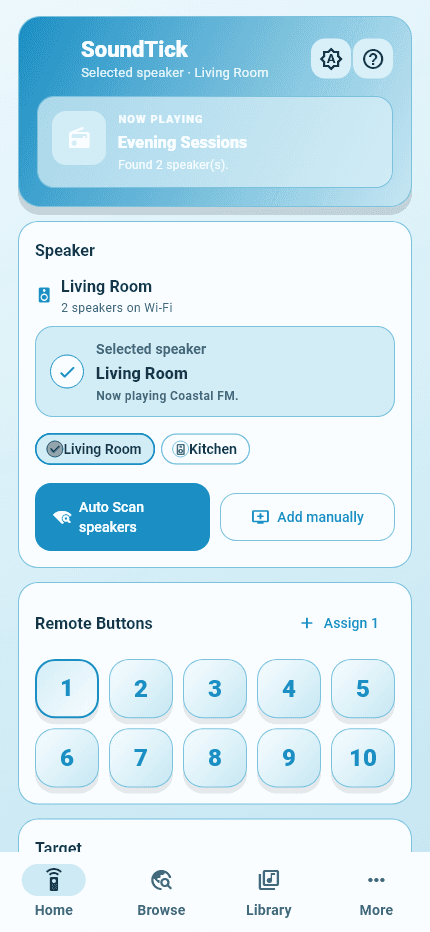
Start with the action that fails
The app cannot find the speaker
Keep the phone and speaker on the same private Wi-Fi, confirm the speaker is powered on, and avoid guest-network isolation or a VPN while testing. Use the existing speaker-discovery guide if the speaker remains missing.
The speaker is visible but music will not start
Music-service browsing and playback initiated inside the SoundTouch app are no longer available after the cloud shutdown. Try a listening method supported by your model, or use SoundTick to find and play compatible internet-radio stations.
One radio station will not play
Try another known station first. A single failed station can have a changed stream, regional restriction or temporary outage even when the speaker and local controls are working.
Keep local controls separate from music discovery
A speaker can remain reachable for setup, volume and grouping while an older cloud-dependent music workflow is unavailable. Test a simple local control separately from starting a station so the result points to the right next step.
Avoid a reset as the first response
Do not erase a working configuration until you have tested the specific failure. Start with the model's reconnect guidance after a router or password change; use a reset only when the applicable instructions require it.
Frequently asked questions
Does an app that cannot start music mean the speaker has failed?
No. Check whether local controls still work and whether the speaker is visible on your private Wi-Fi. The unavailable in-app music workflow is different from a failed speaker or network connection.
What should I test before asking for help?
Record the model, the exact action that fails, whether the speaker appears on the network, whether local volume responds, and whether a second station plays. This separates discovery, control and stream problems.
For compatible internet radio, speaker discovery and everyday local controls, try SoundTick during complimentary access.
Sources and boundaries
Evidence used for this guidance.
Product instructions describe SoundTick's intended behavior. External claims are linked to their primary source. Actual compatibility still depends on the speaker, firmware, phone permissions and network being tested.
- Official SoundTouch end-of-service update Reviewed26 September 2026
- Official SoundTouch end-of-service guidance Reviewed26 September 2026
- Official SoundTouch station troubleshooting Reviewed26 September 2026
- SoundTick speaker compatibility Reviewed26 September 2026
- SoundTick features and listening workflow Reviewed26 September 2026
- SoundTick testing methodology
- Current known limitations
Related guidance